



See Configure Pro at CEDIA Expo 2025 in Crestron Booth #1901
Crestron Electronics, a leading smart home and automation brand in residential and commercial custom integration, is introducing several exciting new products at CEDIA Expo 2025, such as new Cameo keypads, Horizon keypads, and the very cool-looking Cevo Mini Remote. But by far, my favorite launch is the Crestron Home Configure Pro system configuration tool.
Learn more about Crestron Home Configure Pro…
Crestron announced Wednesday the all-new Configure Pro, a system configuration tool for integrators that replaces the existing Crestron Home Setup app. When I hear that a company is coming out with an updated version of an existing product, I am always concerned that it will simply be the same basic product with a fresh new face. That is certainly not the case here. Crestron has built an entirely new tool from the ground up for integrators that looks to be a game-changer. Configure Pro features a modern, all-new design that offers everything Home Setup did and more, but in a much more approachable and intuitive package.
Mind you, I haven’t actually tried it myself, but I have seen screenshots and had a limited demonstration in a Zoom presentation. What I saw knocked my socks off.




Configure Pro – A Major Upgrade Over Crestron Home Setup
If you use Home Setup, you will see a major upgrade with Configure Pro (with all due respect to Home Setup). The result of an extensive, deep design process that has lasted for well over a year, the company’s product team, engineers, and UX (user experience) experts basically rebuilt the solution from the ground up.

What hits you first is that it feels so fresh and modern. It operates much like you’ve come to expect from any modern application today. This is part of the secret of how it feels so intuitive to operate. The minute you launch Configure Pro, you will feel comfortably at home (pun intended). Menus are logically grouped with tiers and dropdowns, and the process continues in an intuitive manner consistent with how most of us configure systems today.
Simple to Start, Simple to Populate, Simple to Control Focus
To start, simply drag & drop to add a room to your system. Then you can drag & drop again to add a device to that room. Just like that, you are well on your way to building a simple but comprehensive, easy-to-use, enjoyable system installation.
Multiple rooms can be grouped in a variety of ways, including showing up in “Floors” of the project. And at any point, you can expand your view to the entire project, or collapse it to any one floor, or even to any one room to focus on an area of concentration. It’s simple to do and extremely helpful.

It’s All About Speed
But Configure Pro is not just about flexibility and power, according to Crestron’s Brad Hintze, “…it’s all about speed.”
So it’s all about speed in getting a home installation done with simplicity and reliability. It’s about how do we make system setup more approachable for more technicians, and how do we just continue to bring in modern techniques and technologies to make our industry – and the experience for the integrator – even better.
Brad Hintze, Crestron Executive Vice President of Global Marketing
An all-new native app, Configure Pro is available for both Mac and PCs. Part of why it feels so modern is that this new user interface leverages OS features, such as copy/paste, shortcuts, drag & drop (wouldn’t the name Dragon Drop be more fun?), and window resizing. More than ever before, Configure Pro provides integrators with a simple step-by-step system setup process that is faster and more reliable, while remaining comprehensive, flexible, and scalable.

Fully Scalable to Any Size Screen
Whether an integrator is using a tablet, a laptop, or a desktop pc, Configure Pro is fully scalable to show as much of the system on the screen as possible. Those using a large-scale 4K desktop monitor could virtually see the entire system in front of them.
The app’s UX engineers incorporated some of the design elements resident in the current Crestron Home end-user app. I suspect this added familiarity was an effort to again improve approachability for the integrators themselves, as well.
A Turbocharged Search Function; Compatibility
While the app features all-new and more modern technology, fear not, Creston assures me it remains fully compatible with today’s and past system setups. In fact, the company says that during the transition period of integrators switching from Home Setup to Configure Pro, their teams can easily switch back and forth if they choose.
Poking around the interface, the user immediately bumps into so many useful features not readily available until now. For example, there is a very useful search bar with the very helpful capability known as auto-suggest or auto-complete (sometimes known as incremental search) to help you quickly find whatever you’re looking for…a device, a driver (more than 3,000 drivers in a database just a couple of key clicks away)…whatever. This turbocharges your search, helping you find whatever you’re looking for faster and easier.

In yet another example of smart design, Crestron designers pre-populated the app with the most common room names, such that they quickly pop up as you start typing the first letter or two of your search. A small but quite helpful time-saver.
Hyperlinks for Ultra-Fast, One-Click Navigation; Multiple Instances Can Be Launched
Also, you’ll find helpful hyperlinks, which help you navigate your system setup within the app – and even to device web UIs (user interfaces), with a simple click. It’s fast and intuitive. Really, much of what this is all about, as Jason Oster, Crestron’s Director of Product Management, Software Applications, told me, is to make Configure Pro “lightning fast!” (Said with much gusto, I might add.)
And here’s a mind blower included with Configure Pro, you can even launch multiple instances of the app running simultaneously. Explains Jason, “Now you can have multiple instances running at the same time which is great, because if I have multiple processors, which is another feature we have, I can be connected to both my lighting processor [in one instance of the app] and my AV processor [in another instance of the app], and tweak things on both sides.

But wait…there’s more…
Remarkably, Configure Pro is a Collaborative Tool
Even though that example is for multiple instances running on my laptop or my desktop computer, you can also have multiple people that can work together. This capability can be really important for our dealers to be able to get in and get out of the jobs quickly – especially with their bigger jobs, where they have their lighting expert and then they have their AV expert. Both experts can be connected now at the same time. The lighting person can be programming the lighting keypads, while the AV person can be adding the Apple TVs and the NAX and things like that. This new capability is a real productivity booster.
Jason Oster, Crestron Director of Product Management, Software Applications

The former Crestron Home Setup was a reasonably powerful tool, but it was largely a singular solution, used serially for a single operator/technician. The ability to accommodate multiple instances for multiple users turns Configure Pro into an all-new collaborative system setup tool.
Fun & Easy Source Routing; Graphical Keypad Configuration; Programming without Programming
Another cool capability is a logical and intuitive source routing capability. Source routing almost becomes child’s play in Configure Pro. In fact, this is one place where the new user interface really shines as hyperlinks allow you to quickly navigate around the system. There is also visual feedback, with color-coded check boxes next to listed system items: a green check – you’re good to go…a yellow check – there’s a problem to run down.

Keypad configuration is graphical and clear. You see a graphical representation of the keypad itself with the page offering clear options for configuration, including keypad actions, engraving, and behavior. Again, color-coded checkmarks confirm configuration status as you go. Sequence building, here too a bit of a visual process, is a piece of cake with a built-in Sequence Editor. This setup simplifies the sometimes complex logic needed in large installations and includes setting delays and conditionals. It’s kind of like programming, but not really programming. (If you get what I mean). Jason pointed out that “reading” the sequence is quite easy and almost feels like natural (English) language programming.

Live Testing; Auto-Discover; >>Early Access Program<< for Crestron Dealers
All this is done while the system is live, so as you walk around the home with your laptop running Configure Pro, you can instantly see (or hear) the effect of, for example, changing light levels or audio levels or if the Apple TV is responding properly to your command sequence entered in the software.
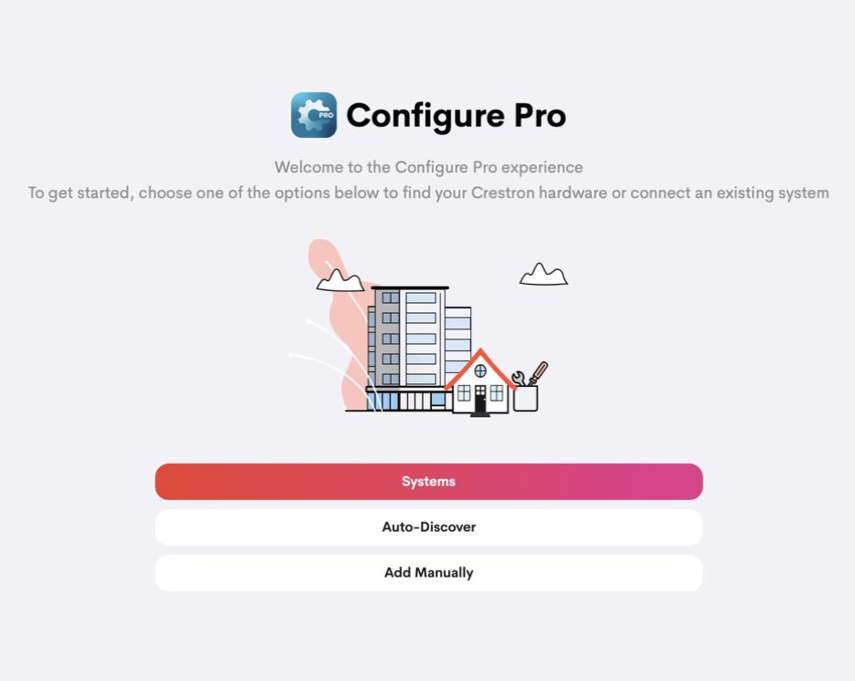
Upon launching Configure Pro, you are presented with a really clean start screen. Integrators can either begin entering systems manually…or simply hit auto-discover, and Configure Pro will do it for you – lightning fast. And just like that, you enter the world of a powerful configuration tool that is simple and intuitive, helping you achieve your installation goals quickly and efficiently.
Configure Pro is expected to be completed and widely available by mid-2026. The company is offering all authorized Crestron dealer the opportunity to participate in an Early Access Program. You register with the company to get early access to the nearly complete app and test it out. The company only asks you provide them with your feedback so the best ideas can be incorporated into the final version.
See Crestron’s Configure Pro at CEDIA Expo 2025
If you are attending CEDIA Expo 2025 in Denver, CO, September 4-6, be sure to stop by the Crestron booth and see all of the new items the company is introducing there. You will especially want to check out Configure Pro, which will be demo’d for you in the Crestron Booth #1901.
Be sure to get your name on the list for the Configure Pro Early Access Program!
See more on Crestron Home by following this link…



Leave a Reply